From cameras to splats — CG, Real-Time, and Real-World
Adelina / Journey / March 2026
A scene is represented as millions of 3D Gaussians — oriented ellipsoids floating in space. Each one carries enough information to describe a tiny patch of a surface or volume.
3DGS is an explicit representation — geometry and appearance are stored directly as discrete Gaussians in 3D space. This enables real-time rasterization: Gaussians are sorted by depth and alpha-composited onto the screen, achieving 30–120 fps on modern hardware.
Kerbl et al., 3D Gaussian Splatting for Real-Time Radiance Field Rendering, SIGGRAPH 2023
Training starts from the sparse SfM point cloud and runs for 7,000–30,000 iterations. Each iteration renders the current Gaussians from a training camera view, computes a loss against the ground-truth image, and backpropagates. The loss is a combination of L1 pixel error (absolute brightness difference) and D-SSIM (structural similarity, which penalises blurry or structurally wrong regions). L1 catches overall brightness; D-SSIM catches texture and edge fidelity.
Adaptive density control runs periodically during training: Gaussians in under-reconstructed regions are cloned (a small Gaussian is duplicated to fill a gap) or split (an over-large Gaussian covering a fine-detail region is replaced by two smaller ones). Gaussians with near-zero opacity are pruned — they contribute nothing and just waste memory. This is how the model grows from ~100k initial points to millions of Gaussians.
Point cloud quality directly affects convergence. A dense, accurate SfM cloud gives training a solid starting geometry — the Gaussians only need to refine, not discover structure. A sparse or noisy cloud means the model must compensate for bad initialisation, requiring more iterations and often converging to a worse result or not at all.
Gaussians refining from noise → coherent scene representation
Raw input from any source — renders, photos, video frames. Coverage from many angles with 60–80%+ overlap between adjacent views.
Detects features, matches across images, triangulates a sparse 3D point cloud, and estimates camera poses. For CG pipelines with known poses, we skip pose estimation and run only point_triangulator.
Takes COLMAP output (sparse cloud + camera poses), trains Gaussian splats over thousands of iterations. Exports .ply — the raw splat file (100 MB – 2 GB).
Remove ghost splats (near-zero opacity), spatial outliers, and unused SH bands. Strip floaters before compression.
10–20× compression for web delivery. Morton code sorting → spatial chunking → quantization → progressive streaming. A 500 MB .ply becomes a 25–50 MB .sog.
Web delivery — PlayCanvas / SuperSplat viewer, real-time in browser
The splat is only as good as the images you feed it
The quality of a Gaussian splat is fundamentally bounded by the quality and coverage of the input images. Garbage in, garbage out.
Every surface that needs to exist in the splat must be visible from multiple angles. Occluded regions become missing geometry.
Adjacent frames must share enough features for matching to work. 60–80% overlap is the target. Too sparse and SfM fails silently.
Blur, motion smear, inconsistent exposure, and texture-less surfaces all reduce reconstruction quality. The splat can't invent detail that isn't there.
Flat white walls, glass, mirrors, and water are the enemies of photogrammetry. SIFT needs distinctive visual features to establish correspondences — if a surface has no texture, COLMAP literally cannot see it. Featureless regions produce no matches, no triangulation, and become holes or floaters in the splat. This is true for both CG renders and real-world captures.
Consistent lighting across all frames is non-negotiable. Mixed sun/shadow (clouds passing overhead mid-capture) or HDR auto-exposure changes make the same surface look different in different frames. This confuses both feature matching (the descriptor changes) and training (the model can't agree on the true colour of a point). For real-world captures, shoot during a single overcast session or in stable golden-hour light — not mid-day with shifting clouds.
Trees swaying in the wind, people walking through frame, and cars moving through a scene all create "floaters" — phantom Gaussians that appear to hover in empty space. The SfM and training process interprets these moving objects as inconsistent 3D structure, and compensates by placing semi-transparent Gaussians at multiple positions. For CG pipelines this is not a concern. For real-world captures, choose your timing carefully: early morning for minimal pedestrian/vehicle traffic.
This is a common trap. After sufficient coverage, additional frames add render time and training time but not quality. What matters is coverage and angular diversity, not sheer volume.
QUALITY vs FRAME COUNT
A well-planned 150-frame capture can outperform a careless 500-frame capture. The balance: enough frames for overlap + angular diversity, but not so many that you waste hours of render or flight time.
Frame step matters too: rendering every frame vs every 2nd or 5th frame of an animation controls density without changing the camera path.
Diminishing returns curve: quality improves steeply from 50–150 frames as coverage fills in, plateaus around 200–300 frames once all surfaces are well-covered from multiple angles, and additional frames beyond that are essentially pure overhead — they add render time, matching time, and training time without meaningfully improving the splat.
COLMAP matching is O(n²): exhaustive matching compares every image against every other image. For 200 images that is 19,900 pairs. For 400 images it is 79,800 pairs — four times the work for twice the images. Doubling your frame count quadruples COLMAP matching time. For 500 images you are comparing 124,750 pairs. This is why large drone captures can take hours in COLMAP before training even starts. Render time, COLMAP matching, and PostShot training all scale with frame count — the cost compounds.
SfM recovers both the 3D structure of a scene and the camera poses simultaneously, using only overlapping images as input.
SIFT scans the image at multiple scales, finding visually distinctive keypoints — corners, edges, blobs — that can be reliably re-identified from different angles.
Keypoints detected at corners and edges — circle radius = detection scale
SIFT detects keypoints in each image. Descriptors are compared to find the same physical point across views.
Scale-Invariant Feature Transform. Finds keypoints at corners, edges, blobs — robust to scale and rotation changes. Each keypoint gets a 128-dim descriptor.
Compare descriptors across image pairs. Nearest-neighbor matching with Lowe's ratio test. RANSAC filters outlier matches geometrically. Result: thousands of verified correspondences.
Two+ rays from different camera positions to the same image point. Intersect the rays in 3D space → recover the point's world position. Requires at least two views.
Global non-linear optimization. Jointly refine all camera poses and all 3D point positions to minimize reprojection error across all images simultaneously.
Sparse 3D point cloud + calibrated camera poses. This is the input to PostShot. For CG pipelines we skip most of this — known poses mean only triangulation is needed.
All commands and workflows here are COLMAP 3.x. COLMAP 4 is in active development with improved feature matching, better GPU acceleration, and a modernised architecture — worth watching, but our current pipelines rely on COLMAP 3.x which is battle-tested and widely supported.
SIFT keypoint detection and descriptor extraction from every image. The keypoints are what COLMAP matches across images.
Exhaustive matching for dome captures (every image vs every other). Sequential matching for video. COLMAP internally runs RANSAC to filter outlier matches geometrically. Exhaustive matching is O(n²) — for 200 images that is 19,900 pairs; for 500 images it is 124,750 pairs. This is why matching can take several hours for large real-world captures. For drone datasets with thousands of images, consider sequential or vocabulary-tree matching to keep matching tractable.
CG pipeline: known poses → point_triangulator only. Fast, because pose estimation is skipped — COLMAP simply projects rays from the known camera positions and finds where they intersect. Real-world pipeline: incremental SfM — COLMAP estimates poses from scratch, one image at a time, growing from a seed pair. Slower and more sensitive to bad input, but handles the uncertainty inherent in real captures.
The most computationally expensive step — and also where the most quality is gained. Bundle adjustment jointly optimises ALL camera poses and ALL 3D point positions simultaneously, minimising total reprojection error across every image at once. This is a large sparse non-linear least-squares problem. For 500 images it can involve millions of variables. Only needed in full SfM mode; when poses are already known (CG pipeline), it is skipped entirely.
COLMAP 3.x — manual PowerShell commands (use when the .bat fails):
# 1. Feature extraction — note camera model params colmap feature_extractor ` --database_path .\database.db ` --image_path .\images ` --ImageReader.camera_model PINHOLE ` --ImageReader.single_camera 1 ` --ImageReader.camera_params "3200.5,3200.5,1920,1080"
# 2. Exhaustive matching (for dome captures) colmap exhaustive_matcher ` --database_path .\database.db
# 3. Triangulation from known poses colmap point_triangulator ` --database_path .\database.db ` --image_path .\images ` --input_path .\sparse\0 ` --output_path .\triangulated
# 4. Inspect result (optional) colmap gui ` --database_path .\database.db ` --image_path .\images ` --import_path .\triangulated
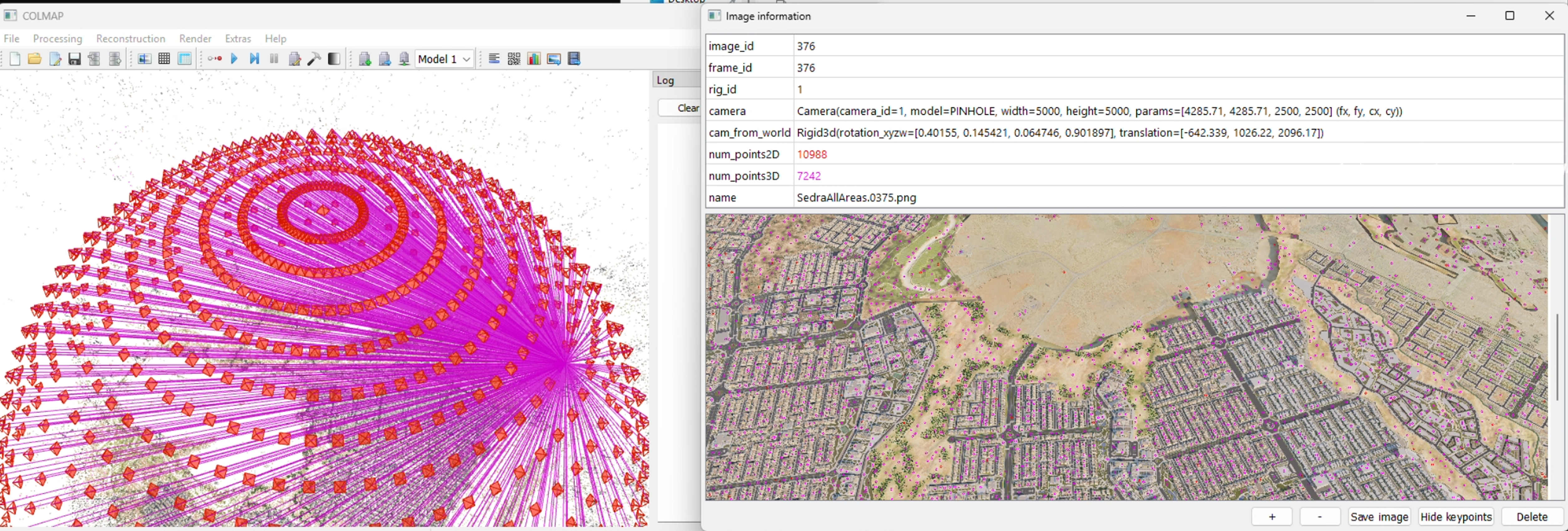
COLMAP — dome camera distribution with projection rays + aerial render
COLMAP 4 is a significant upgrade over 3.x. Our pipelines currently use 3.x, but 4 is worth migrating to:
Replaces SIFT with a learned feature detector. More robust on textureless surfaces, repetitive patterns, and challenging lighting. Fewer failed registrations.
Global SfM instead of incremental. Registers all images simultaneously rather than one at a time. Significantly faster on large datasets and more robust to weak connectivity.
Feature extraction and matching run faster on GPU. Matching 500+ image datasets that took hours in 3.x can finish in minutes.
Neural matcher that replaces brute-force nearest-neighbor. Handles viewpoint changes and lighting variation much better than traditional descriptor matching.
Migration path: our batch GUI already detects COLMAP version and unlocks v4 features automatically. The COLMAP format (cameras.txt, images.txt) is unchanged — downstream pipeline stays the same.
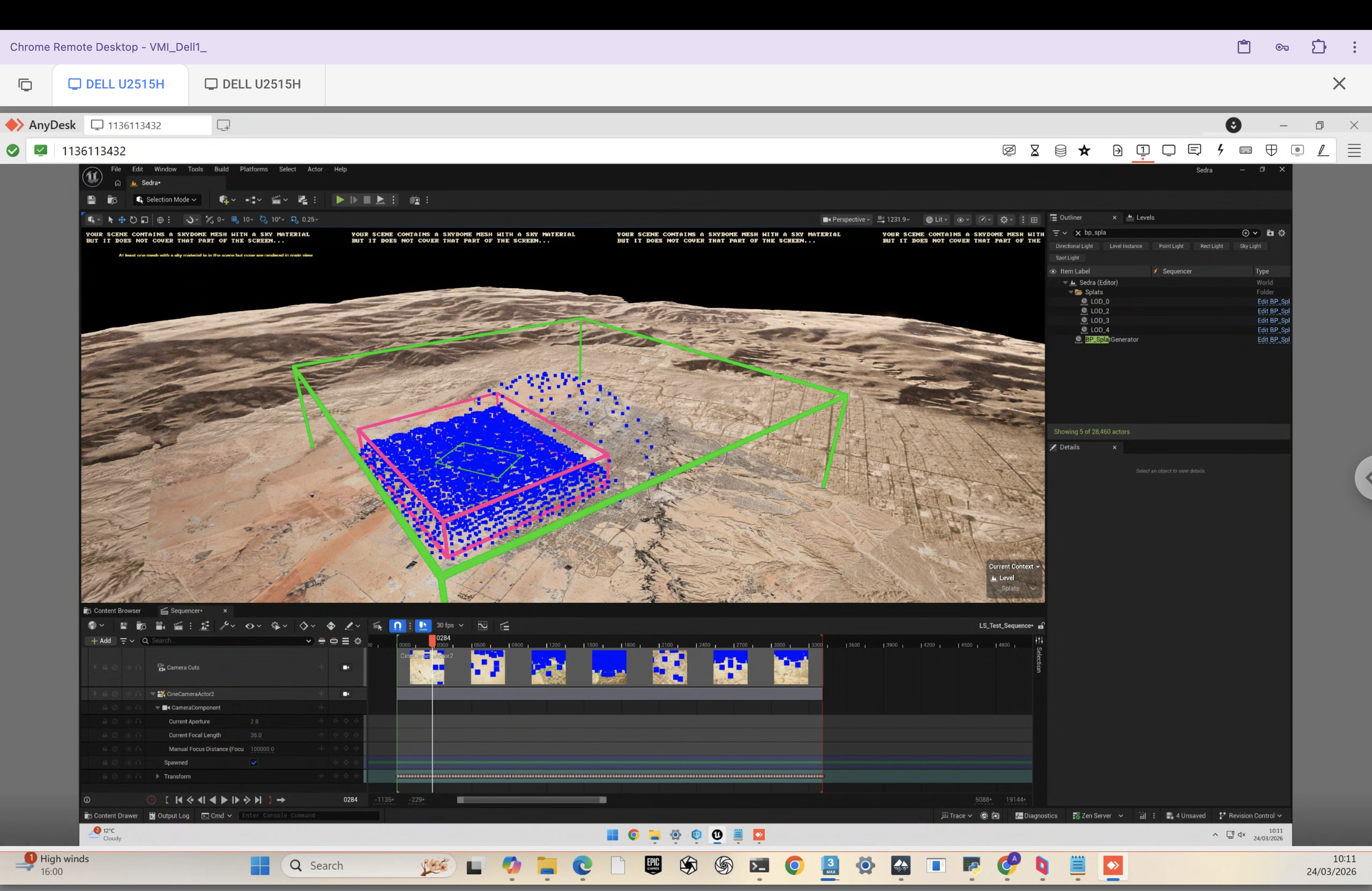
Every camera — virtual or real — is described by a mathematical model. Choosing the wrong one in COLMAP is a silent failure: it runs, it produces output, but the reconstruction quality suffers.
| Model | Params | Distortion | Use Case | Pipeline |
|---|---|---|---|---|
| SIMPLE_PINHOLE | 3 — f, cx, cy | None | Square-pixel virtual cameras, quick tests | CG (simple) |
| PINHOLE | 4 — fx, fy, cx, cy | None | Virtual cameras with non-square pixels or known separate focal lengths | CG (Max, UE) |
| SIMPLE_RADIAL | 4 — f, cx, cy, k1 | 1 radial | Real cameras with mild barrel/pincushion | Drone (simple lens) |
| RADIAL | 5 — f, cx, cy, k1, k2 | 2 radial | Real cameras with moderate distortion | Drone |
| OPENCV | 8 — fx, fy, cx, cy, k1, k2, p1, p2 | 2 radial + 2 tangential | Complex distortion — safe default for real lenses | Drone (recommended) |
| OPENCV_FISHEYE | 8 — fx, fy, cx, cy, k1–k4 | 4 fisheye | Ultra-wide / fisheye lenses (>120° FOV) | Drone (wide-angle) |
| FULL_OPENCV | 12 — fx, fy, cx, cy, k1–k6 | 6 radial | Severe or unusual distortion profiles | Rare / calibrated rigs |
Virtual cameras have zero distortion — no barrel, no pincushion, no rolling shutter, no chromatic aberration. COLMAP triangulation is exact. Use PINHOLE or SIMPLE_PINHOLE. Adding distortion params to a perfect camera wastes degrees of freedom and can make reconstruction worse.
Every physical lens introduces distortion. OPENCV is the safe default for drone captures — models both radial (barrel/pincushion) and tangential (decentring). Using PINHOLE on real images means COLMAP can't model lens bending → worse matches → worse splat. No error — just a worse result.
All models share the same base projection. Distortion models add correction terms before the projection maps 3D → 2D.
CG renders → PINHOLE. Real cameras → OPENCV (or OPENCV_FISHEYE for ultra-wide). Never use PINHOLE on real images. Never add distortion params to virtual cameras. Getting this wrong won't crash — it just silently degrades your splat.
Every tool in the pipeline uses a different coordinate system. Getting this wrong produces invisible failures — COLMAP runs, PostShot trains, but the result is wrong or unusable. No error messages. Just a bad splat.
| Software | Handedness | Up Axis | Forward | Units |
|---|---|---|---|---|
| 3ds Max | Right-handed | Z-up | +Y forward | Centimetres |
| Unreal Engine | Left-handed | Z-up | +X forward | Centimetres |
| COLMAP / PostShot | Right-handed | Y-up | -Z forward | Metres |
X_colmap = X_max * 0.01 Y_colmap = Z_max * 0.01 // Z-up → Y-up Z_colmap = -Y_max * 0.01 // flip + scale
The Y axis becomes the new up axis. Max's forward (+Y) becomes COLMAP's -Z. All positions scaled by 0.01 (cm → m).
X_colmap = X_ue * 0.01 Y_colmap = Z_ue * 0.01 // Z-up → Y-up Z_colmap = -Y_ue * 0.01 // flip handedness + scale
UE is left-handed with Z-up. The handedness flip and Z→Y swap combine into the same formula as Max, since both share Z-up / centimetre units.
Both Max and UE work in centimetres. COLMAP works in metres. Multiplying all positions by 0.01 handles this. Forgetting it gives you a scene that is 100× too large — COLMAP and PostShot will still run, but the splat will look like noise because the Gaussian scale and scene scale are wildly mismatched.
The reason coordinate bugs are so dangerous: most of them do not crash. They produce output that looks almost right but is subtly wrong. A sign flip on one axis makes the splat appear mirrored — you might not notice until the client asks why all the text is backwards. A missing cm→m conversion makes the scene 100× too large, which can still produce a splat, but every Gaussian is initialised at a scale calibrated for a metre-scale scene, not a 100-metre scene — the result is blurry, noisy, and never fully converges. A wrong axis mapping can produce a splat that looks fine from one angle and falls apart from another. There is no error log. The only indication is that the result looks wrong.
Camera orientations in images.txt are stored as quaternions (QW, QX, QY, QZ), not Euler angles. Here is why.
Both cubes perform the same rotation sequence: yaw 90° → pitch 90° → roll 180°. Watch what happens when pitch hits 90°.
At pitch = 90°, yaw and roll axes collapse onto the same axis. The cube loses one degree of freedom — it can only spin one way. This is gimbal lock.
Same rotation, no lock. Quaternions interpolate on a 4D hypersphere — every orientation is reachable from every other, smoothly.
images.txt# IMAGE_ID QW QX QY QZ TX TY TZ CAM_ID NAME 1 0.9914 -0.1243 0.0216 0.0411 -2.34 1.82 5.62 1 frame_0001.jpg # QW QX QY QZ = world-to-camera rotation quaternion # TX TY TZ = camera position (Y-up, metres — already converted)
The MaxScript reads Max's rotation matrix, converts the coordinate system (Z-up → Y-up), then converts to quaternion. This is where bugs are most likely to hide. If your splat looks twisted or inside-out, the quaternion conversion is the first thing to check.
Semi-transparent blobs floating in empty space — the most common artifact.
Caused by: moving objects during capture, insufficient overlap between frames, textureless regions that confuse the optimiser.
Gaps in the reconstruction where surfaces should exist.
Caused by: insufficient coverage, occluded areas never photographed, glass and mirrors confusing SfM feature matching.
Splat appears mirrored, rotated 90°, or 100× too large/small.
Caused by: axis swap errors, unit conversion mistakes (cm vs m), quaternion sign errors. These don't crash — they just produce a bad splat.
Loss of fine detail — the splat looks soft and undefined.
Caused by: motion blur in source images, too few training iterations, camera too far from the subject.
Patches of wrong color across the splat surface.
Caused by: auto white balance enabled during capture, mixed lighting conditions, auto exposure changing between frames.
COLMAP registers only a fraction of the input images.
Caused by: insufficient overlap between views, repetitive facades (buildings with identical windows), textureless surfaces that produce no feature matches.
If your capture is bad, start over. Don't try to fix it downstream.
Post-processing can remove floaters and clean up edges, but it cannot recover missing geometry or fix fundamentally bad camera poses. A clean recapture is almost always faster than trying to salvage a bad one.
PostShot has a built-in SfM engine. You can drop images straight in and get a splat. So why build pipelines at all?
If you have good images with decent overlap and you just need a quick result — PostShot's built-in SfM is fine. This is the fastest path for a proof-of-concept or quick test.
Good for: quick previews, testing if a capture is viable, small scenes with simple geometry.
Our pipelines give us control at every stage. We can provide known camera poses (skipping SfM entirely for CG), choose matching strategies, inspect intermediate results, batch-process dozens of projects, and debug failures by isolating which step went wrong. PostShot is the training engine — but everything upstream needs to be right for it to produce a good result.
Same downstream process — different image acquisition strategies, each with distinct trade-offs.
Tool: 3ds Max + MaxScript
Virtual cameras, full control over placement, coverage, and render settings. Highest fidelity via V-Ray path tracing.
Tool: Unreal Engine + internal plugin
Plugin auto-generates camera dome, near-instant renders. Scene to splat in under 30 minutes.
Tool: Drone / photogrammetry camera
Physical capture. No 3D model needed — reality is the asset. Planning and conditions are the challenge.
Shared downstream: All three feed into the same process — COLMAP triangulation → PostShot training → .ply export → SOGS compression → web delivery. The pipelines diverge only at image acquisition.
| Aspect | 3ds Max (CG) | Unreal Engine | Drone (Real-World) |
|---|---|---|---|
| Capture time | Camera setup: 1-2h | Plugin setup: 15min | Flight: 30-60min |
| Render time | 5-20 min/frame | Seconds/frame | N/A (real photos) |
| COLMAP time | Minutes (known poses) | Minutes (known poses) | Hours (full SfM) |
| Training time | 30min-2h | 30min-2h | 30min-2h |
| Total turnaround | 1-2 days | 30-60 minutes | 2-6 hours |
| Quality | Highest fidelity | Good (Lumen) | Authentic materials |
| Repeatability | Full | Full | Weather-dependent |
cameras.txt + images.txt.ply → SOGS compressCoverage strategy is everything. Three primary formations, used in combination:
Hemisphere of cameras pointing inward. Primary tool for architectural details.
Gradual upward spiral. Ensures vertical continuity across all heights.
Fixed elevation sweeps at low/mid/high. Good for horizontal surfaces.
Animated camera traversing dome positions in 3ds Max
The MaxScript exports two things: the rendered frames (JPEG images from the animation), and a complete COLMAP-format dataset describing where each camera was when it took each frame. This means COLMAP doesn't need to figure out the camera positions — it already has them.
Each animation frame becomes a training image. 150+ JPEGs in images/
Camera intrinsics + per-frame position and rotation, written directly in COLMAP's text format
The COLMAP dataset consists of two text files. cameras.txt defines the lens — focal length and sensor center (same for every frame since it's one virtual camera). images.txt defines where that camera was for each frame — a quaternion for rotation and a translation vector for position.
cameras.txt — one camera, shared by all frames
# CAMERA_ID MODEL WIDTH HEIGHT PARAMS[] 1 PINHOLE 3840 2160 3200.5 3200.5 1920.0 1080.0 # fx fy cx cy # Focal length from FOV, principal point at image center
images.txt — one line per frame (position + rotation)
# IMAGE_ID QW QX QY QZ TX TY TZ CAMERA_ID NAME 1 0.9914 -0.1243 0.0216 0.0411 \ -2.341 1.820 5.620 1 frame_0001.jpg # Quaternion (world→cam rotation) + translation
| Steps | Quality | Use Case | Time |
|---|---|---|---|
| 30 | Draft | Testing coverage, validating camera setup | ~10 min |
| 60 | Default | Production output | ~30–60 min |
| 120 | High | Final exports, hero assets | ~2–4h |
MAX_SPLATS: 800k default. Increase for denser scenes.
At 5–20 min per frame, 150 frames represents 12–50 hours of render time. A master plan scene with 400+ frames and complex V-Ray materials can take 3–4 days of dedicated render farm time. This is why camera placement strategy is critical — every unnecessary frame is wasted compute. A well-planned 150-frame dome is almost always superior to a naive 400-frame capture of the same scene.
Camera FOV also affects effective overlap: a wider FOV captures more of the scene per frame, which can reduce the total frame count needed for coverage. However, extremely wide-angle views (below ~35mm equivalent) can make training harder — the Gaussian optimiser struggles more with the aggressive perspective distortion even in a perfect pinhole camera.
The MaxScript's coordinate conversion is mathematically non-trivial. It is not a simple axis swap. The process is: (1) read Max's camera rotation matrix, (2) apply the coordinate system transform (Z-up right-handed → Y-up right-handed), which produces a new 3×3 rotation matrix, (3) decompose that matrix to a quaternion for COLMAP's format. Off-by-one sign errors in this chain are invisible until the splat trains wrong — COLMAP will run successfully, PostShot will train, but the cameras will be oriented incorrectly and the splat will appear twisted, mirrored, or inverted. Always run a 30-step draft and inspect the camera frustums in the COLMAP GUI before committing to a full training run.
images.txt must exactly match files in images/. Silent failure if mismatched.3D Floorplan
MI L6 — 3ds Max Pipeline
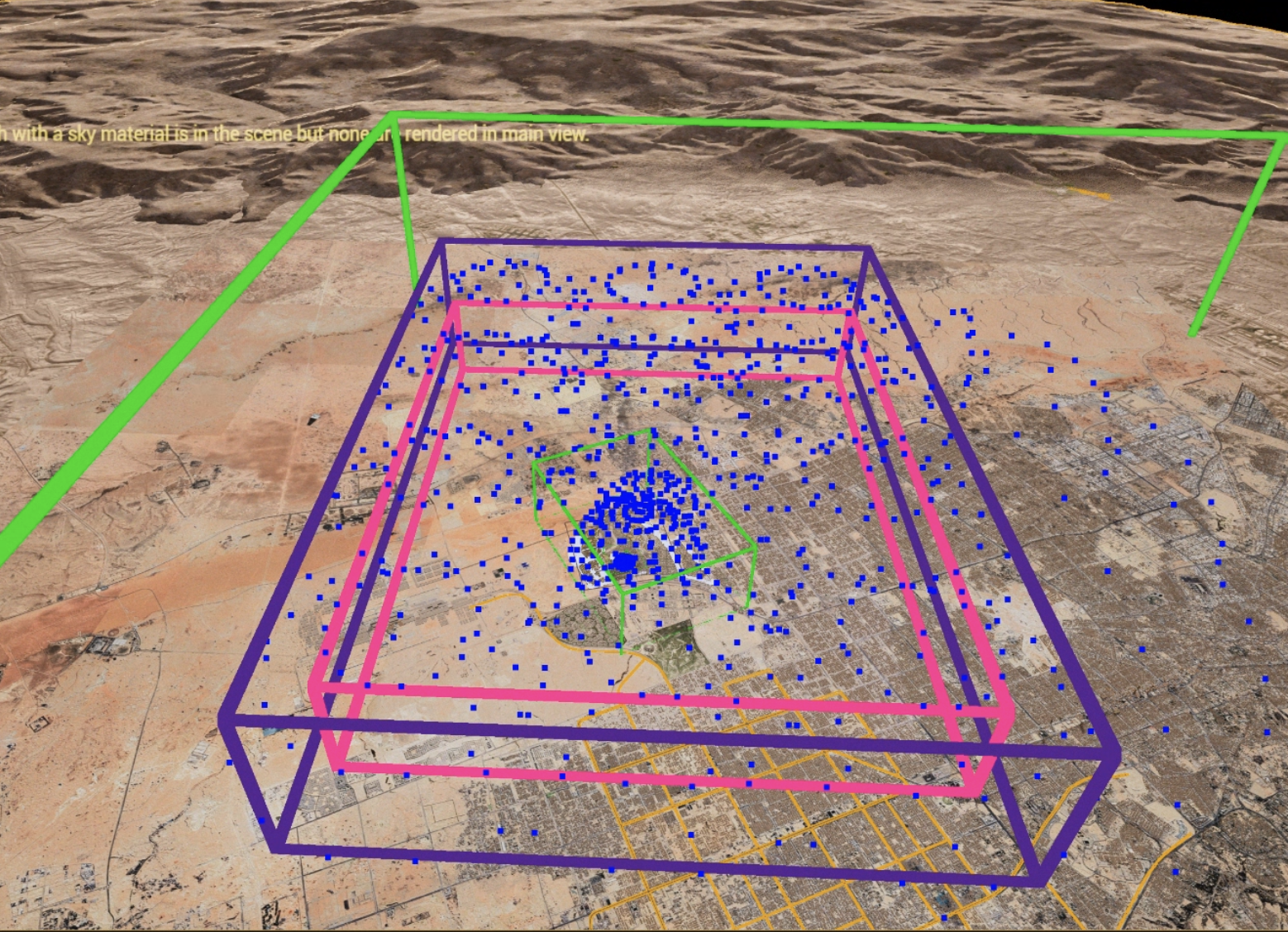
Architectural scene rendered in 3ds Max. Dense dome concentrated around the area of interest, with an overarching dome to capture surrounding context. Camera animated through 200+ positions. Trained in PostShot at 60k steps. Compressed to .sog for web delivery.
Select a region in the UE scene using a bounding box tool. This defines the capture volume — the plugin generates a dome centered on this bounding box.
Configure dome radius, camera sample count, elevation angles, and FOV. These control coverage density and range.
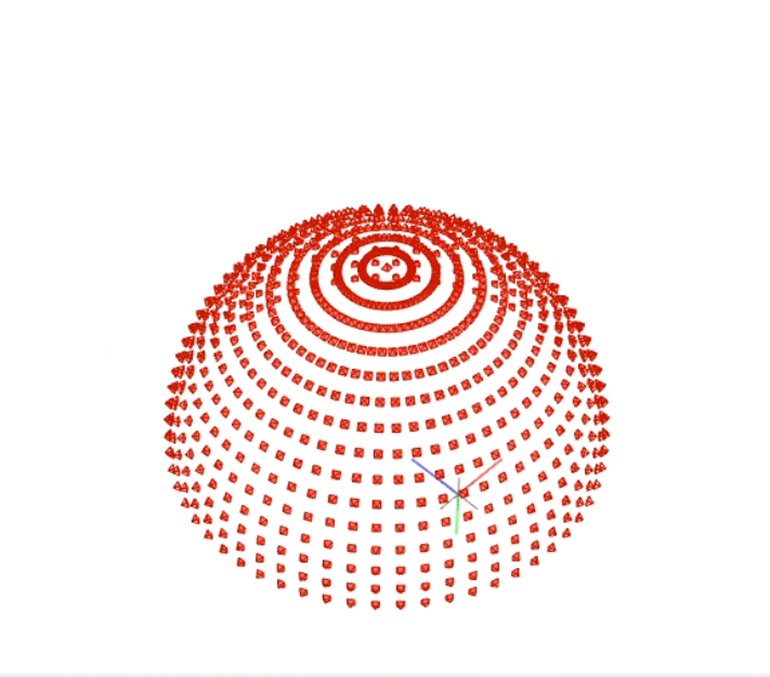
Plugin auto-generates a camera dome — a hemisphere of evenly distributed positions around the subject.
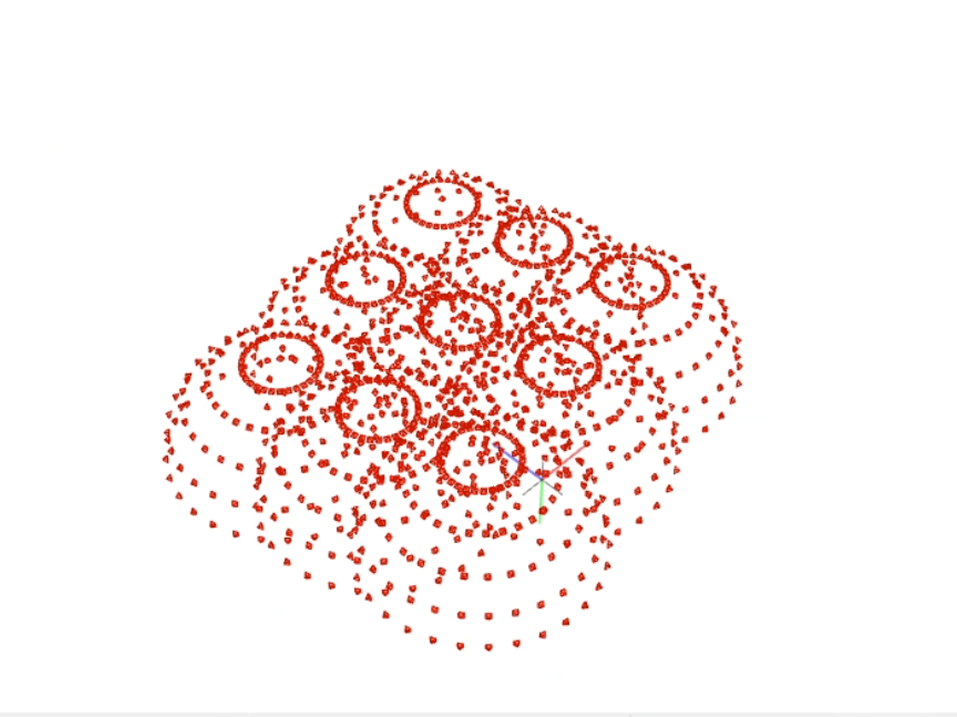
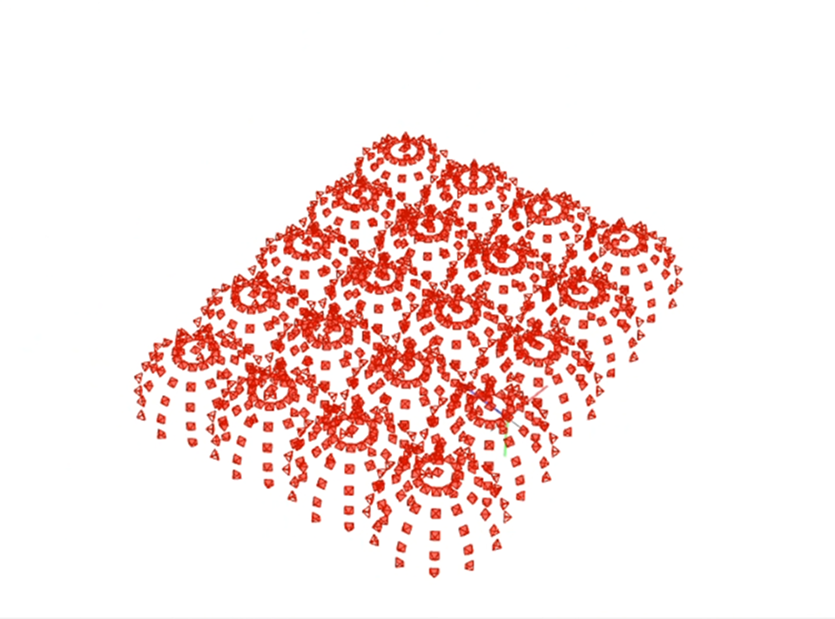
A single camera is animated to move smoothly between all dome points. For multiple areas, create multiple domes — the plugin distributes the frame budget by relative size.
The animated camera is rendered frame by frame via Movie Render Queue. Same principle as 3ds Max — an animated camera whose frames become training images. Frame step controls density.
Export camera transforms in COLMAP format. Same downstream pipeline: COLMAP 3.x triangulation → PostShot training → .ply → SOGS compression → web delivery.
Single dome
Multiple domes
Dense arrangement
Generate dome, render, and check the splat in under 30 minutes. With 3ds Max, the same cycle takes a full day of render time. This enables rapid experimentation with camera placement strategies, dome radii, and elevation angles before locking in a final configuration.
Lumen approximates light bounces; V-Ray/Corona compute them exactly. For early exploration, developer previews, and scenes without complex materials, this difference is negligible. For hero assets where material accuracy matters (glazing reflections, complex metals, accurate shadows), Max remains the higher-fidelity choice.
Sedra
Same fundamentals as CG, but physical constraints replace software parameters.
| Direction | Minimum | Preferred |
|---|---|---|
| Frontal | 70% | 80% |
| Side | 60% | 70% |
More overlap = better reconstruction = better splat. Don't underestimate this.
| Pass | Distance | Altitude | Target | Runs |
|---|---|---|---|---|
| 1A | 150 m | 120 m | Base of building | ×2 |
| 1B | 150 m | 75 m | Horizon top ¼ | ×2 |
| 2A | 100 m | 120 m | Base of building | ×2 |
| 2B | 100 m | 75 m | Horizon top ¼ | ×2 |
| Pass | Distance | Altitude | Purpose |
|---|---|---|---|
| 3A | 250 m | 150 m | City context |
| 3B | 200 m | 75–100 m | Skyline edges |
| 3C | 120 m | 30–50 m | Street level |
Top-down — inner orbits target POI, outer orbits capture horizon context
Drone capture
CG building integrated into drone capture context
Sparse, well-placed cameras that cover all surfaces beat a dense cluster with blind spots. Think about what the splat will need to reconstruct — every surface must be visible from 2+ angles or it will not exist in the splat.
Filenames in images.txt must exactly match files in images/. Mismatches are silent — COLMAP will not error, it will just skip the unmatched frames. You can run a full pipeline and only discover the mismatch when the splat has unexpected holes. Check before every long training run.
Z-up (Max/UE) vs Y-up (COLMAP). Centimetres vs metres. A sign flip produces a mirrored splat. A missing ×0.01 produces a 100× oversized scene that trains to blurry noise. Both run to completion without errors. Always inspect the COLMAP GUI before training.
Run PostShot at 30 steps (~10 min) to validate camera setup and coverage before committing to a 60-step production run (~45 min) or 120-step final export (~3h). If the draft shows holes or misaligned cameras, you have saved hours. A 30-step draft catches bad coordinate conversions, naming mismatches, and coverage gaps.
Camera intrinsic parameters are not correctly passed to COLMAP feature extraction via the .bat file. COLMAP will run but use wrong intrinsics, and the triangulation will be off. Use the manual PowerShell commands from the COLMAP Pipeline slide until this is fixed.
Don't compress a dirty splat. Use splat-transform first: reduce opacity to isolate floaters, remove them, fix rotation. Then SOGS compress for web. A clean 25 MB .sog beats a bloated 50 MB one with phantom Gaussians baked in.
Use COLMAP's OPENCV model (8 parameters) for real cameras. Run a checkerboard calibration session before your capture flight. Autofocus changes the focal length per frame, which invalidates your calibration — always lock focus to infinity/hyperfocal before flying.
Quality plateaus around 200–300 frames. Beyond that, render time, COLMAP exhaustive matching, and PostShot training all scale up — but quality does not. Doubling frames quadruples COLMAP matching time. A well-planned 150-frame capture beats a careless 500-frame one every time.
Keep cameras.txt and images.txt under version control alongside your project. When a splat looks wrong — mirrored, twisted, or misaligned — being able to diff your current export against a known-good one immediately shows whether the coordinate conversion changed. Without this, debugging a bad export means re-running the whole pipeline to find the discrepancy.
Thank You
Adelina / Journey
March 2026